Pi-hole
Network-wide DNS filtering and local name resolution
CASE STUDY / INFRASTRUCTURE
A continuously evolving Linux-based environment used to operate network services, containerized applications, secure remote access, monitoring, DNS infrastructure, and publicly hosted services.
01 / OVERVIEW
My homelab is the environment where I deliberately move beyond theory and operate real services that my network depends on. Rather than treating Linux, networking, DNS, containers, and security as isolated subjects, I use the lab to understand how those systems behave together.
The environment has evolved through multiple hardware and architecture changes. That process has included rebuilding DNS infrastructure, troubleshooting DHCP conflicts, repairing remote access, migrating services, changing internal addressing, and managing both internal and internet-facing applications.
The objective is not simply to keep services running. The lab is designed to create practical experience with deployment, troubleshooting, hardening, failure recovery, and architectural decision-making.
02 / ARCHITECTURE
Public ingress is kept separate from most internal services, while core DNS and remote-access components provide network-wide infrastructure.
>_Diagram is intentionally simplified. Internal addressing, authentication details, firewall rules, and sensitive service configuration are not published.
03 / VISUAL OVERVIEW
High-level architecture and selected screenshots are intentionally sanitized to demonstrate the environment without publishing sensitive network or authentication details.
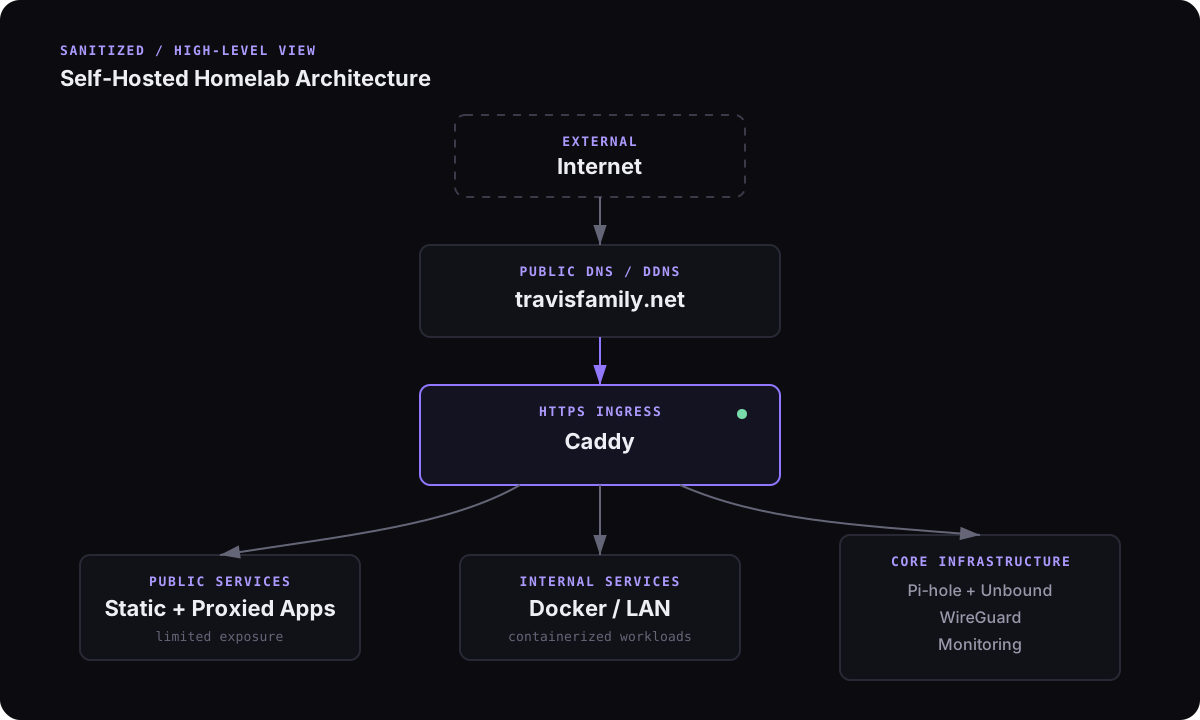
Add a sanitized screenshot aspublic/images/homelab/services.webp
Add a sanitized screenshot aspublic/images/homelab/dns.webp
>_Screenshots should exclude internal IP addresses, public IP addresses, usernames, API keys, tokens, certificate material, client identifiers, and detailed firewall configuration.
04 / SERVICES
Network-wide DNS filtering and local name resolution
Recursive DNS resolution without relying on a public upstream resolver
Encrypted remote access to internal services
Public HTTPS ingress and reverse proxy for hosted services
Containerized deployment and service isolation
Availability and service monitoring
Self-hosted home automation platform
05 / DNS & NETWORKING
DNS is centered around Pi-hole with Unbound providing recursive resolution. This gives me control over network-wide filtering, local hostname resolution, and the path DNS requests take rather than simply forwarding every query to a third-party resolver.
The environment has also provided practical troubleshooting experience around DHCP scope changes, conflicting network services, hard-coded client DNS settings, local versus remote resolution, and the interaction between VPN clients and internal DNS.
WireGuard provides encrypted access back into the network. Public applications are exposed through Caddy where appropriate, while administrative interfaces remain internal whenever practical.
06 / TROUBLESHOOTING
Some of the most useful work in the lab has come from recovering broken systems rather than deploying new ones.
Examples include diagnosing DNS resolution failures over WireGuard, identifying hard-coded client DNS settings, troubleshooting DHCP conflicts, rebuilding services after infrastructure changes, and isolating problems by testing each network layer independently.
I approach those failures by narrowing the problem systematically: verify addressing, routing, listening services, DNS resolution, application connectivity, and finally client configuration.
07 / SKILLS DEMONSTRATED
08 / LESSONS
Core network services should be treated as infrastructure, not just applications.
DNS failures can look like application, VPN, or internet-connectivity failures if the layers are not tested independently.
Separating public ingress from internal application services reduces unnecessary exposure.
Configuration simplicity is valuable: fewer moving parts make failures easier to isolate and recover from.
Documentation and repeatable configuration matter more as the number of services grows.